How to Convert cURL Commands to Fetch and Axios

Most API documentation includes cURL examples because they are compact, universal, and easy to run from a terminal. However, when you are building a JavaScript application, you usually need the same request in Fetch or Axios format.
Converting a simple cURL command is not difficult, but headers, request bodies, authentication tokens, multipart forms, and query parameters can make manual conversion slow and error-prone.
This guide explains how to convert cURL commands to Fetch and Axios with practical examples. You can also use the free cURL to Fetch / Axios Converter on DevToolBox to generate code instantly.
What Is a cURL Command?
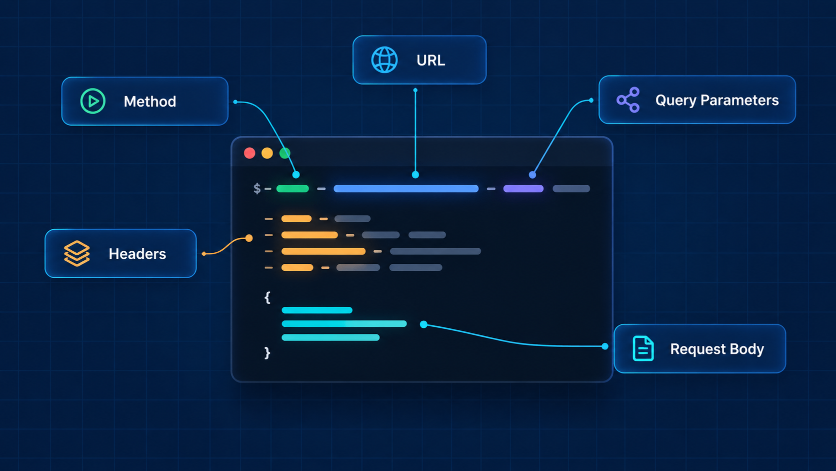
cURL is a command-line tool used to send HTTP requests. Developers commonly use it to test APIs, download files, send form data, and inspect server responses.
Here is a basic cURL GET request:
curl https://api.example.com/usersThis command requests data from the /users endpoint.
A cURL command can include several parts:
The API URL
HTTP method such as GET, POST, PUT, PATCH, or DELETE
Headers
Query parameters
Authentication tokens
JSON or form-data request bodies
When converting cURL to JavaScript, the goal is to preserve these details accurately.
Why Convert cURL to Fetch or Axios?
Fetch and Axios are commonly used to make HTTP requests in JavaScript applications.
Fetch is built into modern browsers and does not require installation. Axios is a popular third-party library that offers a simpler API in many situations, especially when you need interceptors, automatic JSON handling, request cancellation, or consistent error handling.
You may need to convert cURL commands when:
API documentation provides only cURL examples.
You are moving from API testing to frontend implementation.
You need to add an API request to a React, Vue, Angular, or plain JavaScript project.
You want to compare request formats while debugging.
You are integrating a third-party API that requires custom headers or authentication.
cURL to Fetch: Simple GET Request
Consider this cURL request:
curl https://api.example.com/productsThe equivalent Fetch request is:
fetch("https://api.example.com/products")
  .then((response) => {
    if (!response.ok) {
      throw new Error(`Request failed with status ${response.status}`);
    }

    return response.json();
  })
  .then((data) => {
    console.log(data);
  })
  .catch((error) => {
    console.error("API request failed:", error);
  });
The fetch() function sends the request. Before reading the response data, check response.ok. Fetch does not automatically reject the promise for HTTP errors such as 404 or 500, so this check is important.
cURL to Axios: Simple GET Request
The same request in Axios looks like this:
import axios from "axios";

axios
  .get("https://api.example.com/products")
  .then((response) => {
    console.log(response.data);
  })
  .catch((error) => {
    console.error("API request failed:", error);
  });
Axios automatically places the parsed response body in response.data, which is one reason many developers prefer it for API-heavy projects.
Before using Axios, install it in your project:
npm install axiosConvert a cURL POST Request with JSON Data
Many APIs require JSON data in a POST request. Here is a cURL example:
curl -X POST https://api.example.com/users \
  -H "Content-Type: application/json" \
  -d '{"name":"Alex Johnson","email":"alex@example.com"}'
This request sends JSON data to create a user.
Fetch Version
fetch("https://api.example.com/users", {
  method: "POST",
  headers: {
    "Content-Type": "application/json",
  },
  body: JSON.stringify({
    name: "Alex Johnson",
    email: "alex@example.com",
  }),
})
  .then((response) => {
    if (!response.ok) {
      throw new Error(`Request failed with status ${response.status}`);
    }

    return response.json();
  })
  .then((data) => {
    console.log("User created:", data);
  })
  .catch((error) => {
    console.error("Unable to create user:", error);
  });
Axios Version
import axios from "axios";

axios
  .post("https://api.example.com/users", {
    name: "Alex Johnson",
    email: "alex@example.com",
  })
  .then((response) => {
    console.log("User created:", response.data);
  })
  .catch((error) => {
    console.error("Unable to create user:", error);
  });
With Axios, you can pass a JavaScript object directly as the second argument. Axios serializes it as JSON when the appropriate content type is used.

Convert cURL Headers to JavaScript
Headers provide additional information with an API request. They are often used for content type, authentication, API versioning, and client details.
Example cURL request:
curl https://api.example.com/profile \
  -H "Accept: application/json" \
  -H "X-App-Version: 1.0"
Fetch Version
fetch("https://api.example.com/profile", {
  headers: {
    Accept: "application/json",
    "X-App-Version": "1.0",
  },
});
Axios Version
axios.get("https://api.example.com/profile", {
  headers: {
    Accept: "application/json",
    "X-App-Version": "1.0",
  },
});
When converting a request, make sure every required cURL header is included. Missing headers are a common reason an API request works in a terminal but fails in an application.
Convert Bearer Token Authentication
Many APIs use bearer tokens for authentication.
Example cURL request:
curl https://api.example.com/account \
  -H "Authorization: Bearer YOUR_ACCESS_TOKEN"
Fetch Version
fetch("https://api.example.com/account", {
  headers: {
    Authorization: "Bearer YOUR_ACCESS_TOKEN",
  },
});
Axios Version
axios.get("https://api.example.com/account", {
  headers: {
    Authorization: "Bearer YOUR_ACCESS_TOKEN",
  },
});
Do not place real production tokens directly in frontend code. Use environment variables, server-side API routes, or a secure authentication flow where appropriate.
If you need to inspect a JSON Web Token while debugging authentication, you can use the JWT Inspector on DevToolBox.
Convert Query Parameters
Query parameters are added to the URL after a question mark.
Example cURL request:
curl "https://api.example.com/search?q=javascript&page=2"Fetch Version
const params = new URLSearchParams({
  q: "javascript",
  page: "2",
});

fetch(`https://api.example.com/search?${params.toString()}`);
Axios Version
axios.get("https://api.example.com/search", {
  params: {
    q: "javascript",
    page: 2,
  },
});
Axios automatically converts the params object into query parameters. With Fetch, URLSearchParams helps you build encoded URLs safely.
Convert a PUT or PATCH Request
PUT and PATCH requests are used to update data.
Example cURL PATCH request:
curl -X PATCH https://api.example.com/users/42 \
  -H "Content-Type: application/json" \
  -d '{"name":"Alex Smith"}'
Fetch Version
fetch("https://api.example.com/users/42", {
  method: "PATCH",
  headers: {
    "Content-Type": "application/json",
  },
  body: JSON.stringify({
    name: "Alex Smith",
  }),
});
Axios Version
axios.patch("https://api.example.com/users/42", {
  name: "Alex Smith",
});
Use the method specified by the API documentation. A request can fail if you use POST when the endpoint expects PATCH or PUT.
Convert a DELETE Request
Example cURL request:
curl -X DELETE https://api.example.com/users/42 \
  -H "Authorization: Bearer YOUR_ACCESS_TOKEN"
Fetch Version
fetch("https://api.example.com/users/42", {
  method: "DELETE",
  headers: {
    Authorization: "Bearer YOUR_ACCESS_TOKEN",
  },
});
Axios Version
axios.delete("https://api.example.com/users/42", {
  headers: {
    Authorization: "Bearer YOUR_ACCESS_TOKEN",
  },
});
Some delete endpoints return an empty response, such as HTTP 204 No Content. In that case, do not call response.json() unless the API documentation confirms that a JSON body is returned.
Common Mistakes When Converting cURL Commands
Forgetting the HTTP Method
If a cURL command uses -X POST, -X PATCH, or -X DELETE, include the same method in your JavaScript request.
Missing Headers
Copy required headers, especially Authorization, Content-Type, and Accept. Without them, the server may reject the request or interpret the body incorrectly.
Sending JSON Without JSON.stringify()
In Fetch, JavaScript objects must be converted to a JSON string before being sent in the request body.
body: JSON.stringify({ name: "Alex Johnson" })Axios handles this automatically when you pass an object.
Testing a Browser Request Against a CORS-Blocked API
A cURL request runs from your terminal, while Fetch and Axios usually run in a browser. An API may allow terminal requests but block browser requests because of Cross-Origin Resource Sharing (CORS) rules.
If the browser console shows a CORS error, the API server must allow your website’s origin. This cannot be fixed only by changing Fetch or Axios code.
Exposing Sensitive Credentials
Never add production API keys, passwords, private tokens, or secrets directly to public frontend JavaScript. Anything sent to the browser can potentially be viewed by users.
Use a cURL Converter to Save Time
Manual conversion is useful when you want to understand the request. However, for long commands with multiple headers, authentication, nested JSON, form data, or complex flags, a converter is faster and reduces copying mistakes.
Use the DevToolBox cURL to Fetch / Axios Converter to paste a cURL command and generate code for:
JavaScript Fetch
Axios
Python Requests
PHP Guzzle
The tool extracts the request method, headers, and payload so you can start with a readable code example instead of rewriting the command from scratch.
Final Thoughts
cURL is often the starting point for API integration, while Fetch and Axios are the formats you will use in a JavaScript application. The key is to preserve the method, URL, headers, authentication, query parameters, and request body when converting the command.
For quick conversions, paste your command into the cURL to Fetch / Axios Converter and use the generated code as a starting point. Then test the request in your application and adjust it to match the API’s documentation and security requirements.